
AI Interface Design
Integrating AI into Design Systems: Step-by-Step Guide
Make your design system AI-ready: audit tokens, add metadata, set governance, automate tasks, and test to scale consistent UI production.

AI is transforming design systems. By automating repetitive tasks, it saves time and ensures consistency in UI development. Here's how you can integrate AI into your design system:
Start with an evaluation: Check if your design tokens, components, and documentation are machine-readable. Use semantic naming conventions to ensure AI understands and applies styles correctly.
Structure your tokens: Organize them into three levels - Primitive, Semantic, and Component. Add metadata like descriptions and relationships for better AI interpretation.
Automate repetitive tasks: AI can handle tasks like updating documentation, creating component variants, and identifying accessibility issues.
Set governance rules: Define policies for AI usage, classify tools by data sensitivity, and document standards to maintain consistency.
Test and scale gradually: Pilot AI features with a small team, measure outputs, and expand usage as confidence grows.
AI can improve efficiency by up to 40–60% when integrated into a well-structured system. However, human oversight remains critical to ensure quality and alignment with design standards. Start small, refine processes, and scale as your team grows comfortable with AI tools.
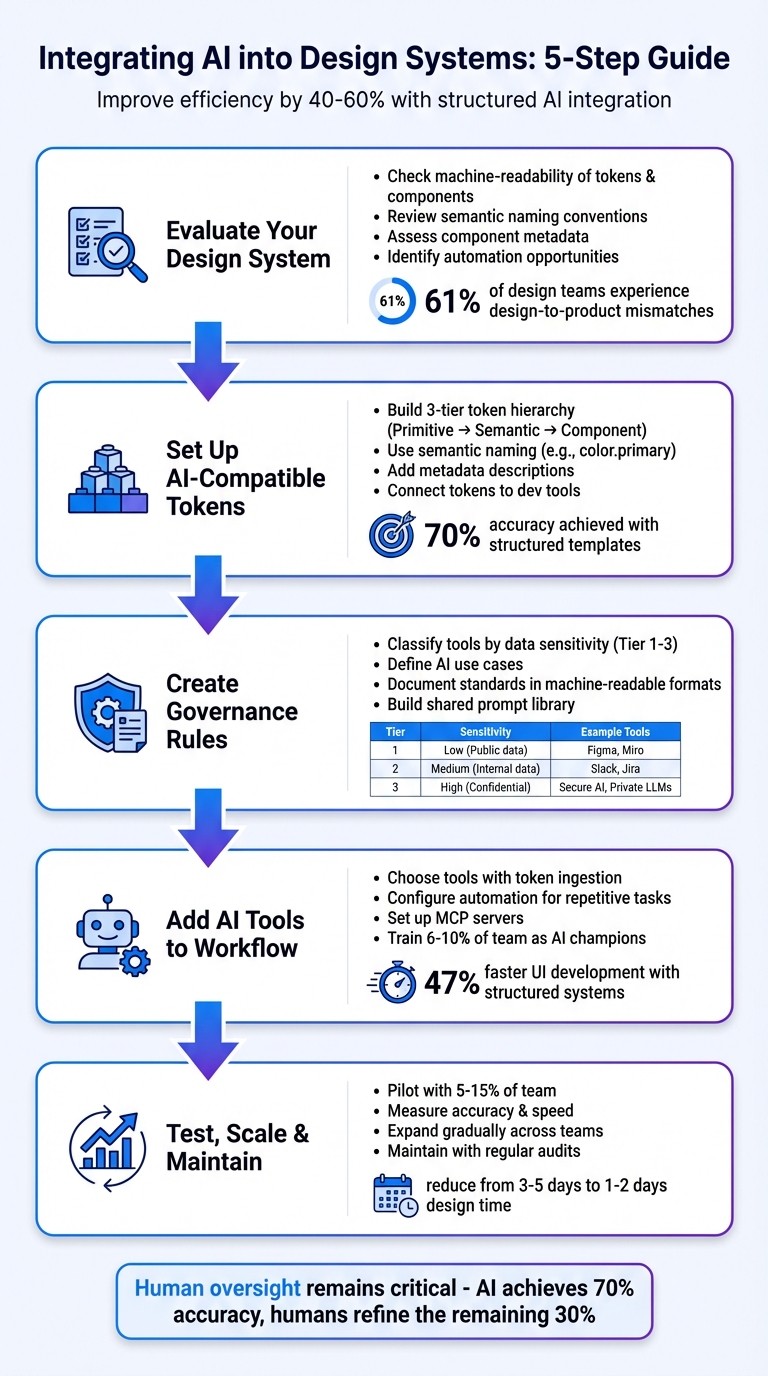
5-Step Process for Integrating AI into Design Systems
I Built My Entire Design System in 4 Hours With AI. Full Tutorial (Claude + Cursor + Figma)

Step 1: Evaluate Your Design System for AI Integration
Before diving into AI integration, take a step back and assess your design system. This evaluation will help you pinpoint the adjustments needed to make your system AI-friendly. The difference between a design system that works seamlessly with AI and one that doesn’t often boils down to three key aspects: semantic naming, modular structure, and machine-readable documentation.
Start with the basics. Can AI tools interpret your design tokens and components? Are your naming conventions consistent across platforms like Figma and your codebase? A 2024 survey found that 61% of design teams experienced frequent mismatches between their design systems and the final product. These inconsistencies can lead to AI-generated code that falls short of your standards.
Review Your Components and Tokens
Your token structure plays a critical role in how well AI understands and works with your design system. A well-organized token hierarchy is key, and it should include three layers:
Primitive: Raw values like
#0066CCSemantic: Intent-driven names like
color.primaryComponent: Context-specific labels like
button.background
Literal naming conventions (e.g., color.blue) can limit AI's ability to apply tokens correctly across various contexts. Instead, opt for semantic names like color.action.primary to ensure flexibility and accuracy.
Next, take a close look at your component metadata. AI needs more than just visuals - it requires detailed information about component states (hover, active, disabled), props, accessibility guidelines, and usage rules. Without this structured metadata, AI might generate incomplete or inaccurate component variants. Diana Wolosin, author of Building AI-Driven Design Systems, highlights this by stating, "Design systems must evolve into structured data to be useful in machine learning workflows".
Consistency is also crucial. Ensure that your naming conventions in Figma align with those in your codebase. Pierre Bremell explains, "If the structure of your system is not consistent and machine-readable, tools like Cursor will fail to understand it".
Once your tokens and metadata are in order, the next step is identifying areas where AI can step in to automate repetitive tasks.
Find Tasks That AI Can Automate
AI thrives on repetitive, rules-based tasks - so identifying these areas in your workflow is essential. Look for tasks like updating documentation, generating component variants, adjusting layouts, or creating unit tests.
At Atlassian, AI prototyping demonstrated its potential by achieving around 70% accuracy in replicating design system standards in a single pass when structured templates were used. This shows how AI can handle well-defined tasks with impressive efficiency.
Be on the lookout for "system drift", where manual adjustments - like tweaking spacing instead of using tokens or engineers manually interpreting designs - create inconsistencies. These friction points are prime candidates for AI-driven automation, which can enforce consistency and reduce errors.
Evaluation Area | What to Check | Why It Matters for AI |
|---|---|---|
Token Naming | Semantic vs. literal names | Ensures AI maps styles correctly (e.g., |
Token Structure | Three-tier hierarchy (Primitive/Semantic/Component) | Enables dynamic, system-wide updates |
Documentation | Availability in JSON, YAML, or Markdown formats | Ensures AI can parse and apply documentation reliably |
Component Metadata | Detailed states, props, and accessibility rules | Prevents AI from creating invalid or incomplete variants |
Design-Code Sync | Consistent naming in Figma and the codebase | Reduces AI errors and incorrect imports |
Step 2: Set Up AI-Compatible Design Tokens and Structures
Once you've completed your evaluation, it's time to build an infrastructure that works seamlessly with AI. This involves creating a structured system for your design tokens, enriched with metadata that clarifies their purpose and use.
Build a Token System That Scales
To ensure scalability, organize your tokens into a three-tiered hierarchy: Primitive, Semantic, and Component. This structure, which you partially assessed during your evaluation, provides AI with the necessary context to make informed choices across various scenarios.
The key to making tokens AI-compatible lies in their naming. Use clear, semantic names like color-interactive-primary and numerical scales such as space-100 or space-200. This approach ensures consistency and allows AI to interpret and adapt tokens effectively. For instance, when switching themes, AI can adjust values while preserving the intended logic.
"Tokens are the API contract between design and code." - Romina Kavcic, Design System Consultant
Enhance your token definitions by adding a description field in your JSON files. Instead of merely specifying a value like #d32f2f, include metadata such as: "Use for destructive button backgrounds". Start with the 20 most frequently used tokens to see immediate improvements in how AI interprets and applies them.
Additionally, document token relationships in your metadata. For example, if a specific background token requires a particular text color to meet accessibility standards, make that pairing explicit. This prevents AI from generating combinations that fail WCAG compliance.
Once your tokens are fully defined and enriched, integrate them directly into your development tools to streamline their application.
Connect Tokens to Your Development Tools
After defining scalable tokens, the next step is to integrate them into your production pipeline. Your tokens should seamlessly flow from design tools into production code across all platforms. Tools like Style Dictionary are industry favorites for this purpose. They can transform a single JSON source of truth into platform-specific formats such as CSS variables, Swift code, or Android XML.
For AI-specific integrations, expose your design data using the Model Context Protocol (MCP). This protocol allows AI tools like Claude or Cursor to query your design system programmatically, eliminating the need for guesswork with static files. A real-world example comes from Atlassian, which developed a custom MCP server (@atlaskit/ads-mcp) in November 2025. This server made over 20,000 lines of searchable documentation accessible to AI tools. During their "AI Product Builders Week", 1,000 employees utilized this infrastructure, with 85% reporting greater confidence in using AI tools. The system achieved approximately 70% accuracy in generating design prototypes on the first attempt.
For older tokens, consider creating Markdown guides (e.g., token-usage-guide.md) that outline semantic rules and usage constraints for AI. Test your setup by asking an AI tool to create a form using your tokens. If the AI defaults to primitive tokens instead of semantic ones, or if it generates invalid color combinations, your metadata likely needs refinement. The ultimate goal is to make your design system so intuitive that AI can navigate it as effectively as your most experienced developer.
Step 3: Create AI Governance Rules and Guidelines
Once your AI-compatible token structure is in place, the next step is to establish governance rules to manage how AI is used within your design system. These rules ensure that AI outputs align with brand standards, meet accessibility requirements, and comply with data privacy regulations. A solid governance framework outlines when AI should be used, what data can be shared, and how accountability is maintained.
Set Clear Rules for AI Usage
Start by creating a tiered framework to classify tools based on their level of vetting and the type of data they handle. For example:
Tool Tier | Policy | Data Type Allowed |
|---|---|---|
Tier 1: Approved | Fully vetted by Security/Legal | Internal & Confidential |
Tier 2: Unvetted | Public tools without enterprise agreements | Public Data Only |
Tier 3: Local | Tools running on local machines only | Internal (cloud-sync disabled) |
This structure simplifies risk assessment by categorizing tools into clear tiers. Tier 1 tools, like GitHub Copilot or Slack AI, are vetted for handling sensitive data, while Tier 2 tools are limited to public data. Tier 3 tools operate locally, avoiding cloud synchronization to protect internal data. This classification minimizes the need for constant legal review.
In addition to tool classification, define specific use cases for AI. For instance, AI can assist with tasks like drafting initial content or generating alt-text, but final decisions should always involve human oversight. Use in-context popovers to explain AI outputs, and implement checkpoints where humans review and mitigate potential biases. To maintain transparency, label all AI-generated content with a visible "AI label."
Document Standards for Your Team
Clearly document these governance rules in machine-readable formats such as Markdown, JSON, or YAML. Storing these files in version-controlled repositories (e.g., GitHub) ensures that teams always have access to the most up-to-date guidelines and can track any changes over time.
Create an internal wiki that lists approved tools and relevant points of contact. Additionally, develop natural language guidelines specifying tone, length, and terminology for AI-generated content. These guidelines can be integrated into design tools - like Figma plugins - that help enforce compliance by flagging deviations automatically. To further streamline workflows, consider building a shared prompt library, where teams can document standardized prompts. This ensures consistent outputs across different projects and users.
"A design system that requires manual enforcement isn't a system. It's a set of guidelines you'll violate the moment deadlines tighten." - Netguru Blog
To maintain quality at scale, enforce these standards at the point of generation using automated tools. With governance and documentation firmly in place, you’ll be ready to seamlessly incorporate AI tools into your design workflow in the next step.
Step 4: Add AI Tools to Your Design Workflow
Once you've set up governance rules and an AI-ready token structure, it's time to bring AI tools into your design workflow. The main objective here is to automate repetitive tasks while ensuring that the results remain consistent with your design system from the very beginning. This involves selecting tools that can understand your specific components and tailoring them to fit your team's processes.
Choose the Right AI Tools
When evaluating AI tools, focus on three key features: token ingestion (importing elements like spacing, colors, and typography), generation constraints (enforcing your system's rules), and bidirectional sync (keeping design and code automatically aligned). Tools such as Supernova, Token Studio, and Specify excel in these areas and can integrate directly with platforms like Figma or your code repositories.
Look for tools that can adapt to your repository's unique setup, including props, naming conventions, and architectural patterns. Generic code generators often fall short here. For example, Atlassian demonstrated how using JSON constraints in their AI tools nearly eliminated output errors and dramatically increased user confidence.
It's also important to select tools that support machine-readable formats like JSON, YAML, or Markdown, along with protocols such as the Model Context Protocol (MCP). These standards allow AI to interact with your design system programmatically. Before diving in, audit your tokens to ensure they use semantic naming conventions (e.g., color.primary instead of color.blue), which helps AI accurately map styles across platforms. Once you've chosen tools with strong token ingestion and sync capabilities, focus on automating repetitive tasks through precise configurations.
Configure Automation and Team Collaboration
After selecting the right AI tools, the next step is to integrate them into your workflow. Start by deploying AI for mechanical tasks - the kind of repetitive work that doesn’t require creative decision-making. Examples include updating documentation, scaffolding variants, renaming layers, and making layout adjustments.
To ensure consistency, configure your AI to load tokens first, adhering strictly to your design boundaries. In a 2024 survey, 61% of design teams reported frequent inconsistencies between their design system and the final products. System-aware tools can help avoid these issues by making it difficult to stray from established rules.
For precision-critical elements, use JSON configurations to prevent AI from altering core component code. This approach ensures deterministic changes and avoids errors where AI might generate plausible but incorrect outputs.
Setting up MCP servers can further enhance your workflow by exposing design data to AI coding tools like Cursor. This allows the AI to directly access layers, extract exact spacing, and identify dependencies from Figma files or code repositories. To avoid system-wide disruptions, break your automation pipelines into smaller, focused workflows - for example, handling core tokens, theme variations (like light and dark modes), and component mapping separately.
"A design system is our foundation. When AI or new technologies come into play, we're ready to scale because the groundwork is already there." - Joe Cahill, Creative Director, Unqork
Another effective strategy is to create a shared prompt library where your team can document standardized prompts for common tasks. This ensures consistent results across projects and users. Teams using structured systems like IBM's Carbon Design System have reported building UIs 47% faster than starting from scratch, and the efficiency only increases when paired with AI. Finally, train a small group - around 6–10% of your team - as AI champions to maintain expertise and guide others.
Step 5: Test, Scale, and Maintain Your AI-Powered Design System
Test AI Features for Quality and Consistency
Before introducing AI features across your team, treat the evaluation process like unit testing. Run a variety of test scenarios through your AI, assess whether the outputs align with your expectations, and assign a quality score before proceeding. Teams that adopt structured testing methods have achieved up to 70% accuracy in replicating design system standards in one go.
Start by rolling out the AI features to a small pilot group - about 5–15% of your team. Use this phase to measure accuracy, speed, and design consistency. Track improvements in task completion times and overall team satisfaction. To ensure quality, use checklists to verify that AI-generated patterns are based on actual design system components, account for all states (like empty, typing, error, and success), and meet accessibility and platform-specific standards. Establish benchmarks and conduct evaluation cycles every few weeks. With proper adjustments, AI-driven design systems can cut design time by 40–60%, reducing the process from 3–5 days to just 1–2 days.
Expand AI Usage Across Teams and Projects
Once you've validated the quality of AI outputs, gradually scale its use. Train a small group - around 6–10% of your team - to become experts in using AI tools effectively. These experts can help spread AI literacy and share best practices across your organization. Structured implementation programs have shown impressive results, such as creating 115 new AI workflows and boosting confidence in AI tools for 85% of participants.
To ensure consistency, adopt a "system-aware" approach. This means configuring your AI tools to use design tokens and components from the start, which helps minimize inconsistencies. This is crucial because 61% of design teams report frequent mismatches between their design system and the final product. Preconfigured code templates can also keep AI-generated prototypes aligned with your brand and design guidelines from the very first prompt .
For even greater efficiency, consider exposing your design data through Model Context Protocol (MCP) servers. These servers allow AI tools to programmatically access design tokens, components, and documentation. For example, in late 2025, Atlassian implemented an MCP server that made over 20,000 lines of design guidance searchable, along with 5,000 lines of detailed guidance across more than 50 component packages. Developers using structured systems like IBM's Carbon have already experienced a 47% faster UI development process compared to starting from scratch, and AI can amplify these gains.
With these strategies in place, your next focus should be on keeping the system updated.
Keep Your System Updated and Maintained
Maintaining an AI-powered design system requires active governance. Move away from static style guides and use tools that enforce standards automatically during content generation. Regularly refine the plain-language instructions, examples, and constraints provided to AI models to ensure they stay accurate as your system evolves.
This maintenance process should include routine audits of your tokens and naming conventions. Inconsistent naming can disrupt automation and lead to errors. Use a dependency graph to identify which elements update automatically and which require manual intervention. For critical choices like logos or navigation, structured configuration files (e.g., JSON) allow the AI to adjust settings without altering code, reducing the risk of errors or "hallucinations".
Automating evaluations and benchmarks is another key step. Break your documentation into small, modular pieces tied directly to components. This approach makes it easier for both humans and AI tools to access the right context. With 25% of new code now AI-generated, keeping documentation machine-readable ensures your system remains functional and efficient.
Conclusion: Making AI Work in Your Design System
Bringing AI into your design system can streamline those repetitive tasks that often lead to system drift. Start with small, manageable steps, test thoroughly, and expand gradually. Begin by auditing your tokens to ensure they follow semantic, machine-readable naming conventions. This structured groundwork is key to successfully integrating AI.
AI is particularly effective at handling tasks like updating documentation, generating component variants, and ensuring consistency across platforms. These are areas where AI truly shines. To start, train a small group of dedicated users to build expertise, then expand its use as confidence grows. For best results, ensure your system relies on structured, machine-readable data, whether through APIs or Model Context Protocol servers.
Even with these advancements, human oversight remains essential. Think of AI as a helpful assistant - its output still requires review. While AI can achieve up to 70% accuracy in replicating design system standards in one pass, the remaining 30% relies on human judgment to refine designs or decide when to evolve patterns. Combining AI automation with pre-coded templates and JSON configurations can minimize errors and keep outputs aligned with your system’s architectural standards.
The advantages are hard to ignore. For example, developers using structured design systems like IBM's Carbon can build UIs 47% faster compared to starting from scratch. With thoughtful planning, consistent maintenance, and a gradual rollout, an AI-powered design system can become a powerful tool that strengthens your team's efficiency and keeps you ahead of the curve.
FAQs
How can I make my design system compatible with AI?
To make your design system work seamlessly with AI, start by identifying which AI features will best serve your users. This could include things like personalization or automated layouts. Use research to pinpoint these needs and document them thoroughly - this will serve as the backbone for your design decisions.
Next, focus on creating machine-readable design tokens. These should have consistent naming conventions for elements like colors, spacing, and components (e.g., color-primary, spacing-small). Adding metadata is key here - it helps label AI-generated components clearly, offering transparency about their purpose and the data they rely on.
Lastly, don’t skip testing. Ensure your system meets high standards for accessibility and performance. AI-driven interactions should be intuitive, ethical, and inclusive. If you’re looking for specialized help, studios like Exalt Studio can assist with implementation, ensuring your system is scalable and ready for the future.
How can AI streamline my design workflow?
AI has the potential to transform your design workflow by taking care of repetitive tasks, freeing up your time, and boosting overall efficiency. It can tackle things like generating code, recommending UI components, syncing design tokens, running accessibility checks, and even creating design variations. On top of that, AI can assist in producing documentation and offering data-backed insights to help you make smarter decisions.
By weaving AI into your design system, you can dedicate more energy to the creative and strategic aspects of your work, leaving the routine tasks to AI. This approach ensures a more seamless and productive workflow.
What are the key tips for maintaining an AI-powered design system?
Maintaining an AI-powered design system involves blending solid design principles with practices tailored for AI. Start by implementing clear version control using semantic versioning (major, minor, patch) and keeping detailed changelogs. This ensures both humans and AI tools can track changes effectively. Automating tasks like tagging, documentation, and quality checks can boost consistency and reliability. And don’t forget: always have a backup and rollback plan in place to handle errors smoothly.
Keep the system modular and predictable by sticking to consistent naming conventions for tokens and components, all stored in a centralized source of truth. Clear and thorough documentation is key - it helps AI tools make better suggestions, minimizing gaps between design and implementation. Regular automated testing for visual consistency and accessibility ensures the system works seamlessly, even at scale.
Lastly, ensure governance and transparency by openly disclosing AI-generated content, safeguarding data privacy, and maintaining a log of AI-driven changes. Routine reviews of components and AI outputs are essential to keep the system aligned with brand standards and user expectations. Tools like Exalt Studio can assist in putting these practices into action, helping your AI-enhanced design system remain reliable, scalable, and focused on user needs.