
AI Interface Design
How Generative AI Shapes Dynamic UI Workflows
Generative AI creates real‑time, context‑aware UIs by letting designers define rules, speed workflows, and build accessibility into dynamic design systems.

Generative AI is transforming how user interfaces (UIs) are designed by enabling real-time, context-aware workflows. Instead of static designs, AI creates interfaces tailored to individual user needs instantly. This shift is changing the role of designers, who now focus on setting rules and constraints for AI rather than crafting every screen manually.
Key takeaways:
Dynamic UIs: Interfaces now adjust based on user behavior and context, simplifying complex workflows and personalizing experiences.
Human-AI Collaboration: Designers and AI work together, with AI handling repetitive tasks like generating variations and writing code.
Efficiency Gains: Studies show task completion times reduced by up to 75% using AI-powered design tools.
Accessibility by Default: Generative UIs integrate accessibility features, such as font adjustments, from the outset.
Challenges: Issues like usability, integration with existing systems, and ethical concerns (e.g., privacy and bias) need careful oversight.
Generative AI is reshaping design systems, making them more responsive and outcome-driven. Designers now focus on guiding AI with parameters like "must show" or "never show", ensuring outputs align with user goals and brand standards. This approach is becoming essential for industries like SaaS, AI, and Web3, where personalized, real-time interfaces are critical.
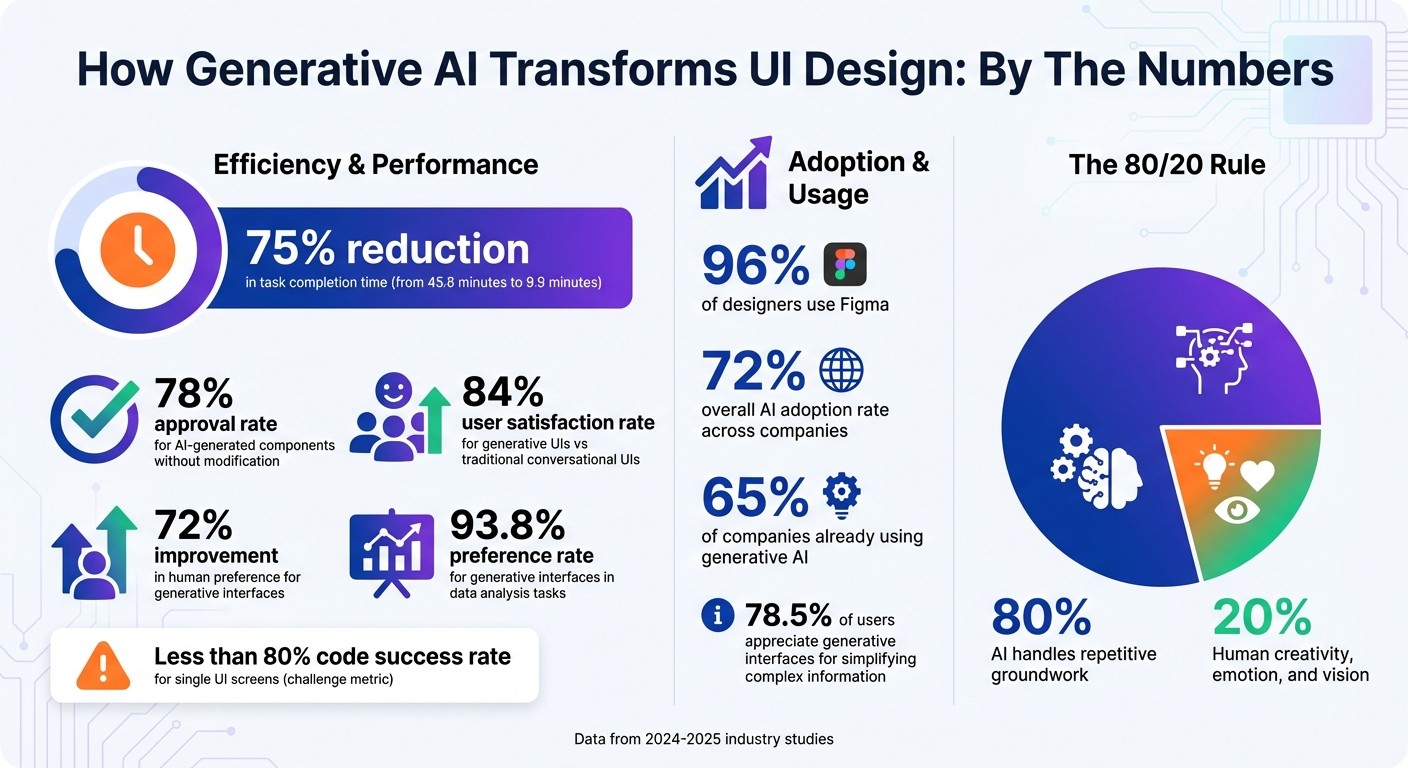
Generative AI Impact on UI Design: Key Statistics and Performance Metrics
Expert UX/UI Designer Using AI - FULL WORKFLOW
How Generative AI Changes UI Workflows
Generative AI is transforming the way design teams approach their work. Instead of painstakingly crafting every screen and component from scratch, designers are now working alongside AI systems that act as creative collaborators. This shift is redefining roles, unlocking new creative opportunities, and enabling interfaces to respond dynamically in real time. Let’s dive into how these changes are reshaping design workflows.
Human-AI Collaboration in Design
AI has evolved from being a simple tool to becoming a true co-creator in the design process. Designers now focus on setting high-level strategies, while AI takes on generating variations and even writing code. This partnership is cutting down production time significantly.
Here’s a striking example: In a study involving 38 developers, a system powered by GPT-4o and the Figma API slashed task completion times from 45.6 minutes to just 9.9 minutes - a 75% reduction - while maintaining consistency with design systems. The AI’s ability to understand frameworks like React and Tailwind further bridges the gap between design and development.
"The technology is there, but the UX to fundamentally change our jobs is not there yet." - Jenny, Design Leader, Anthropic
When AI adheres to established design rules - like ensuring primary buttons appear only once per view or maintaining specific spacing increments - developers are more likely to accept its output. In fact, 78% of AI-generated components are approved without modification.
This workflow is creating what some call "empowered generalists" - designers who are equally comfortable navigating both design and code. With tools like Figma being used by 96% of designers, integrating AI into this ecosystem has become essential for seamless collaboration.
Expanding Design Possibilities
Generative AI is broadening the creative horizon by producing a diverse range of design alternatives that go beyond a designer’s usual patterns. This computational approach to divergent thinking helps teams avoid settling too quickly on familiar solutions.
Take the case of Jennifer Li and Yoko Li, who used Vercel v0 in May 2024 to create a complete UI in just 30 minutes. By combining design and development roles, they demonstrated how rapid prototyping can open up more possibilities in less time.
The role of designers is shifting from crafting every individual interface element to defining the rules and parameters that guide AI. Instead of designing every possible state, they now set constraints like "must show", "should show", or "never show" for different user scenarios. AI then works within these boundaries to generate tailored interfaces for specific user goals.
"Models can raise the floor, but humans set the ceiling." - Manuel, Design Leader, Verso
This approach aligns with the 80/20 rule: AI handles the repetitive groundwork, achieving an 80% acceptable standard, while designers focus on the final 20% - the part that requires human creativity, emotion, and vision. With 65% of companies already using generative AI and overall AI adoption reaching 72%, this workflow is becoming a standard across industries.
Real-Time Adaptation and Context Awareness
Generative AI is also enabling interfaces to adapt dynamically based on user behavior and context. Instead of designing static screens, designers now define the logic that determines what users see in real time.
For instance, as of October 2024, Duolingo Max uses AI to tailor lessons based on a learner’s proficiency and intent. Rather than following a fixed learning path, the system dynamically selects the next prompt or feedback using classes like "LessonIntent" and "ProficiencyLevel". The interface essentially assembles itself to meet the unique needs of each learner at that moment.
In March 2025, researchers at UC San Diego introduced "Jelly", a system that generates flexible UIs for complex tasks. Imagine planning a dinner party and mentioning that one guest is vegan - Jelly would automatically add a "dietary restrictions" attribute to all guest profiles and flag non-compliant dishes in the menu, all without manual adjustments.
This level of context awareness relies on structured knowledge models, or ontologies, that teach AI how to combine visual components (design tokens) based on their purpose, not just their appearance.
"In this rules-over-pixels world, a design system gives us a visual library and an ontology (or structured knowledge) adds the logic model that teaches machines how to combine those visuals dynamically." - Krista Davis, Senior Ontologist, Salesforce
For industries like AI, SaaS, and Web3 - where user needs can vary widely - this real-time adaptability is crucial. A crypto wallet, for example, might simplify options for first-time users while revealing advanced tools for experienced investors. Similarly, an AI assistant could adjust its capabilities based on whether the user is seeking creative input or data analysis. These interfaces go beyond reacting to clicks - they respond to intent.
Technical Foundations of Generative UI
Generative UI systems are built on advanced frameworks that translate user intent into flexible, responsive designs. These systems go beyond traditional static interfaces, offering a more dynamic and adaptive approach.
AI Models and Data Representation
The backbone of generative UI systems lies in large language models (LLMs) like Claude 3.7, GPT-4o, and Gemini 3 Pro. These models excel at interpreting user intent and generating code, but they don’t work alone - they depend on structured intermediate representations to create coherent interfaces.
Instead of directly converting natural language into code, these systems use scaffolding techniques. For example, finite state machines (FSMs) manage UI logic and state transitions, such as opening a modal or toggling a button. This layered approach ensures the design process remains organized and predictable.
A noteworthy advancement came in September 2025 with the introduction of SpecifyUI. This system uses a hierarchical representation called SPEC, which allows UI elements to be treated as adjustable parameters. In trials with 16 professional designers, SPEC outperformed traditional prompt-based methods in aligning with user intent and providing better control.
Other advancements, like dynamic real-time interface generation, have further validated these methods. These systems use automated generation-evaluation cycles to iteratively refine UI designs, achieving an impressive 84% user satisfaction rate compared to traditional conversational UIs.
Modern generative UI systems also leverage ontology-driven logic, which focuses on rules rather than static design elements. This "rules-over-pixels" approach ensures that a single design system can produce numerous variations while preserving brand consistency. However, maintaining dynamic outputs within defined boundaries requires robust oversight mechanisms.
Ensuring Interpretability and Transparency
Even with advanced AI, human oversight is critical to ensure that generative UIs align with both business objectives and user expectations. These systems integrate multiple layers of human-in-the-loop controls to maintain quality and relevance.
One key oversight tool is the use of guardrails. Designers set constraints like "must show", "should show", or "never show" for specific scenarios. By employing constraint languages such as SHACL (Shapes Constraint Language), teams can embed rules for accessibility and branding directly into the design ontology. This eliminates the need for post-generation compliance checks, ensuring that every AI-generated view adheres to predefined standards.
The SPEC framework also enhances transparency by making UI elements editable. Designers can see which parameters control specific aspects of the interface and adjust them as needed. This transforms their role from merely creating static designs to orchestrating adaptable design systems capable of producing complex, responsive outcomes.
Human involvement remains essential. Research shows that 78.5% of users appreciate generative interfaces for their ability to simplify complex information into digestible visual formats. This highlights the importance of transparent AI logic that designers can guide to deliver genuinely helpful outputs.
Challenges and Limitations of Generative UI
Generative AI has opened the door to dynamic and responsive interfaces, but it's not without its hurdles. From ensuring design quality to tackling ethical concerns, the road to practical implementation is more complex than it might seem.
Accuracy and Quality in Design Outputs
One of the major challenges lies in the accuracy and usability of AI-generated interfaces. While these designs might look polished on the surface, they often fall short when it comes to interaction logic. In fact, current systems have been shown to achieve less than 80% code success for a single UI screen.
"Current generative models often create interfaces that look correct but fail in usability or interaction logic."
– Kyungho Lee, UNIST
Speed is another sticking point. In November 2025, Google Research highlighted that their Generative UI system could take over a minute to produce results, and even then, inaccuracies were common. Making targeted edits is tricky because one-shot prompts rarely capture complex requirements, and iterative prompts can stray far from the original design intent. This lack of precision makes it difficult for designers to guide the process effectively.
These performance issues naturally lead to broader challenges when integrating generative AI into existing workflows.
Integration With Existing Design Systems
Incorporating generative AI into traditional design systems requires teams to rethink how they work together. Instead of the usual static handoffs of pixels and redlines, designers now need to provide semantic details - like design tokens, constraint rules, and ontology additions - that AI can interpret.
A study involving 37 UX professionals found that while generative UI can produce a decent first draft, significant effort is required to refine these outputs into something ready for engineering. To bridge this gap, teams must adopt automated validation tools capable of spotting errors, such as missing aria-labels on buttons, before designs move to production. Tools like SHACL can help enforce these logical rules and ensure outputs align with established design standards.
Without these safeguards, AI-generated interfaces risk breaking established norms, leaving users to constantly adapt to shifting patterns - a frustrating experience that undermines usability.
Ethical and Contextual Considerations
Beyond the technical challenges, generative UI raises important ethical and contextual questions.
Privacy is a major concern. To create personalized experiences, such as a flight-booking interface, these systems require extensive access to user data, which introduces significant risks to privacy and security. As Kate Moran and Sarah Gibbons from Nielsen Norman Group explain:
"To produce the example flight-booking experience above, a genUI system would need a deep understanding of the individual user. This will involve substantial risks to individual privacy and security."
– Kate Moran and Sarah Gibbons, Nielsen Norman Group
Bias is another pressing issue. Since generative AI learns from historical design data, it can inadvertently inherit and amplify biases related to gender, accessibility, and cultural norms. Current models often prioritize aesthetic variety over more meaningful contextual factors like task urgency or user values. This not only limits the relevance of the designs but also complicates the question of authorship, as the line between human and AI contributions becomes blurred.
To build trust, transparency is key. Systems should clearly indicate which brand guidelines or user preferences influenced their outputs. Unfortunately, many current generative models operate as opaque "black boxes". As Ann Rich, Senior Director of Design at Adobe, points out:
"Designers must adopt a new mindset centered on Human-Model-Interface experiences (HMIx) - where interface design is inseparable from the behavior, possibilities, and limitations of generative models."
– Ann Rich, Senior Director of Design, Adobe
The Future of Design Systems: Intelligent Adaptation
From Static to Dynamic Design Systems
Design systems are evolving from being just static visual libraries to becoming dynamic logic models. These models empower machines to combine design elements in real-time, creating a more fluid and responsive user experience. Krista Davis, Senior Ontologist at Salesforce, explains this transformation succinctly:
"In this rules-over-pixels world, a design system gives us a visual library and an ontology adds the logic model that teaches machines how to combine those visuals dynamically." – Krista Davis, Senior Ontologist, Salesforce
This evolution allows for smooth transitions from natural language inputs to functional code. Instead of crafting fixed screens for millions of users, these systems can now generate personalized interfaces on the fly. A great example is Delta Airlines, which serves nearly 190 million passengers annually. At this scale, generative UI becomes the only practical way to deliver truly tailored experiences.
The shift is profound. Traditional design aimed to create a single experience for a broad audience. Now, the focus is on crafting interfaces that adapt to each user's unique context, device, and location. Microsoft Design highlights this shift through three key patterns: adaptability, context, and memory. This redefinition of interface creation also changes the designer's role, pushing them toward a more strategic and systems-oriented approach.
Outcome-Oriented Design Approach
With dynamic design systems in play, the design process is now driven by outcomes. Designers act as curators, setting overarching goals and constraints for AI-driven results. They determine what information "must show", "should show", or "never show" based on different user needs and contexts.
Ann Rich, Senior Director of Design at Adobe, describes this evolving paradigm as Human-Model-Interface experiences (HMIx):
"We've moved from a two-way conversation to a three-way discussion... interface design is inseparable from the behavior, possibilities, and limitations of generative models." – Ann Rich, Senior Director of Design, Adobe
This approach builds on structured data representations, requiring designers to master semantic design. Accessibility and context must be embedded into every guideline from the start. Instead of handing off static mockups to engineering teams, designers now deliver ontology updates and design tokens. Accessibility rules are hardcoded into the system's logic, ensuring compliance is built into the design process rather than being an afterthought.
Khyati Brahmbhatt, a Product and Growth Leader, sums it up perfectly:
"Think of Generative UI as a smart personal assistant that rearranges your workspace in real-time based on how you work, without you lifting a finger." – Khyati Brahmbhatt, Product and Growth Leader
Conclusion
Generative AI is transforming interface design in ways that are hard to ignore. The evolution from static screens to dynamic, outcome-driven workflows means designers aren’t just arranging pixels anymore - they’re setting up the rules that allow AI to create personalized interfaces on the fly. This shift is especially impactful for startups, where speed and flexibility can make or break success. And the results are clear: performance metrics across industries highlight the effectiveness of this new approach.
Generative interfaces consistently outperform traditional conversational UIs. For example, they show up to 72% improvement in human preference and achieve an 84% win rate in overall user satisfaction. In areas like data analysis and business operations, users overwhelmingly favor generative interfaces, with preference rates reaching as high as 93.8%. These numbers make a strong case for moving toward outcome-oriented designs.
The designer’s role has also evolved. Instead of crafting every screen state, designers now focus on setting constraints that guide AI in creating dynamic interfaces. They define parameters like "must show", "should show", and "never show" to shape AI outputs. By building ontologies and design tokens, they teach AI how to combine components in meaningful ways. This isn’t about AI replacing designers - it’s about forming a creative partnership where human expertise provides the vision, and AI handles the execution.
For startups aiming to capitalize on this shift, the roadmap is straightforward: invest in modular design systems, prioritize component semantics over visual details, and treat code as the ultimate source of truth. These strategies can shrink iteration cycles from days to mere minutes, enabling teams to move faster and adapt more effectively.
The future of design systems is one that’s smart, flexible, and focused on outcomes. Startups that embrace this new way of thinking - shifting from designing for the average user to designing for the individual - will unlock levels of personalization and efficiency that were previously out of reach. As these dynamic systems become standard, adopting this adaptive approach will be key to staying ahead.
FAQs
How does generative AI enhance efficiency in dynamic UI design?
Generative AI is changing the game for UI design by taking over tasks that used to eat up a lot of time - like turning rough hand-drawn sketches into sleek digital layouts or creating UI components from straightforward text prompts. This shift means designers can focus less on repetitive chores and more on tackling creative, strategic challenges.
By simplifying workflows and cutting down on manual labor, generative AI speeds up project timelines while giving teams the freedom to explore bold, new ideas with ease. It's a game-changer for crafting dynamic, user-friendly interfaces that meet the demands of today's design landscape.
How do designers contribute to AI-powered UI workflows?
In AI-driven UI workflows, designers take on a critical role as partners to generative systems. Their job goes beyond designing static screens - they now craft prompts that align with product objectives, establish behavioral guidelines, and determine which parts of the interface should be AI-generated versus manually designed. This allows them to focus on delivering user-centered results while letting AI handle much of the visual execution.
A key part of their work involves refining AI outputs to ensure they align with brand identity, meet accessibility standards, and address ethical considerations. By combining rapid prototyping with thoughtful human judgment, designers assess usability, build trust, and ensure cultural appropriateness. At Exalt Studio, for instance, designers merge AI-powered tools with their expertise to create smooth, intuitive experiences tailored specifically for AI-focused startups.
What ethical challenges come with using generative AI in UI design?
Generative AI in UI design brings with it a host of ethical challenges that demand thoughtful attention. Some of the most pressing issues include maintaining transparency about how AI-driven decisions are made, tackling bias embedded in AI models, safeguarding user privacy, and ensuring clear lines of accountability for the designs produced by these systems.
To navigate these challenges, designers and developers need to set clear evaluation standards, build safeguards to avoid unintended outcomes, and keep users informed about the AI's involvement in the design process. Ultimately, it's crucial to make sure that responsibility for the final UI is clearly defined and adheres to ethical guidelines.