Blockchain UX
Designing Transparent Blockchain Error Messages
How to craft clear, actionable blockchain error messages—use plain language, visual cues, retry options, and standardized codes to reduce user friction.

Clear blockchain error messages are crucial for user trust and retention. Unlike traditional systems, blockchain transactions are irreversible, and vague messages can leave users confused, frustrated, and vulnerable to mistakes or scams. To improve user experience, error messages must be simple, actionable, and accessible.
Key Takeaways:
Common Issues: Gas errors, nonce conflicts, slippage, smart contract reverts, and validation failures.
Why It Matters: 68% of users abandon financial apps during onboarding, often due to unclear error handling.
Best Practices:
Use plain language (e.g., "Add more ETH for gas fees" instead of technical jargon).
Provide actionable next steps and recovery options.
Include visual cues (icons, bold text) for accessibility.
Test for usability and ensure errors are detailed yet concise.
Transparent error messages not only resolve user frustrations but also reduce risks and improve confidence in blockchain platforms.
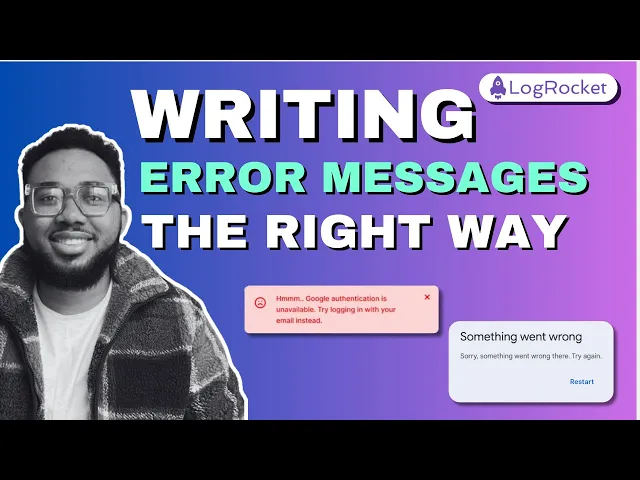
UX TUTORIAL: Designing an error message the right way
Common Blockchain Transaction Errors
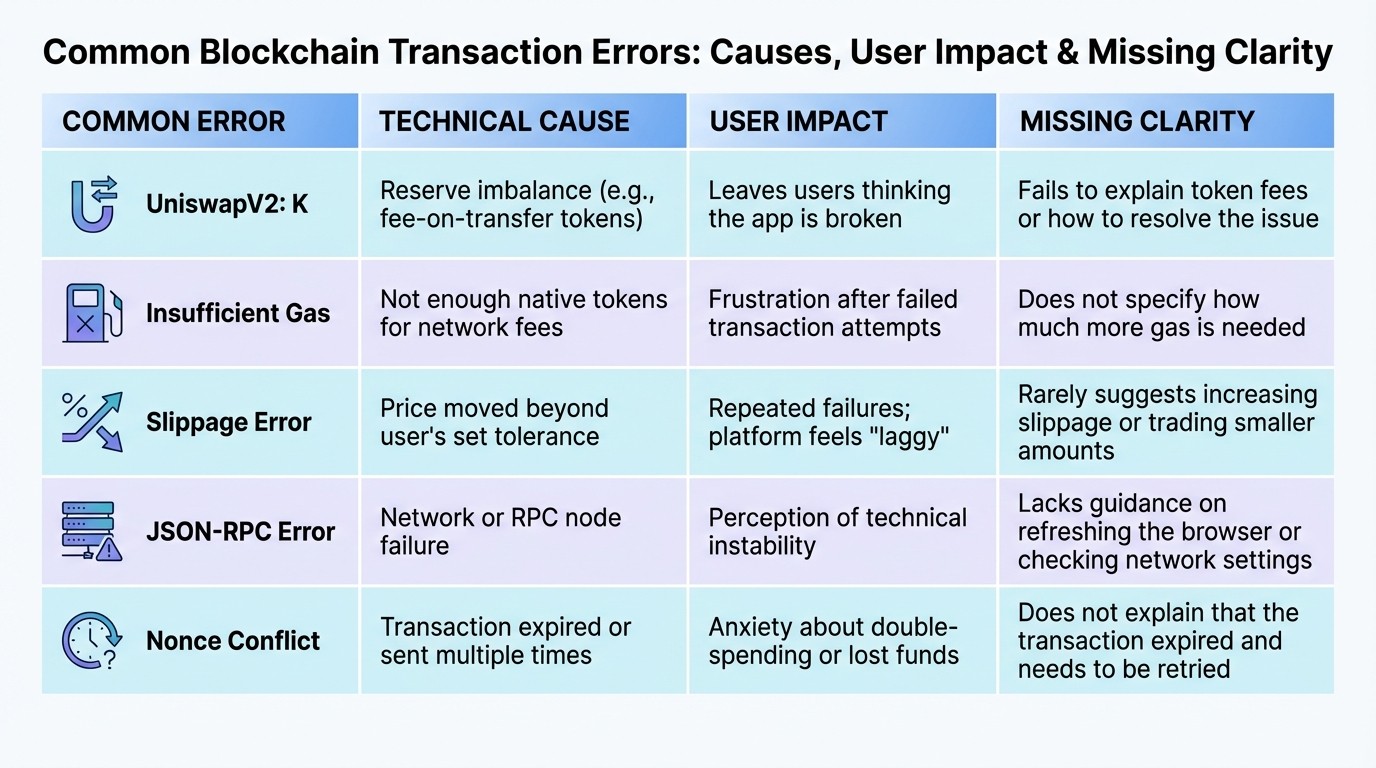
Common Blockchain Transaction Errors: Causes, User Impact, and Missing Clarity
Types of Blockchain Transaction Errors
Blockchain transactions can fail for a variety of reasons, often leaving users puzzled. One common issue involves gas-related errors. These occur when a user either doesn’t have enough funds to cover network fees or sets the gas limit too low. Every transaction requires a minimum gas amount, known as intrinsic gas, which is determined by its size in bytes. If the gas limit falls short of this baseline, the transaction gets rejected right away.
Another frequent problem involves nonce conflicts. These arise when there’s a mismatch in transaction order. For example, skipped transactions result in a "NonceTooHigh" error, while reused nonces trigger a "NonceTooLow" error. Such issues often stem from delays in transaction propagation.
Smart contract reverts are another headache. These happen when the logic within a smart contract fails - for instance, if a user tries to transfer more tokens than are available or if prices change beyond the set tolerance. Mempool issues can also cause transactions to get stuck or dropped. This typically happens when the gas price is too low to compete with current network demand. Lastly, validation failures occur before transactions even reach the blockchain. These are usually caused by malformed signatures, incorrect wallet permissions, or connecting to the wrong network .
Interestingly, data shows that 90% of errors in DeFi transactions can be resolved by simply increasing slippage tolerance. Additionally, as of November 2023, nearly 30% of Ethereum's transaction flow was handled by intent-based protocols, which aim to reduce uncertainty around these execution failures.
Next, let’s explore how poor error messages contribute to user frustration.
How Poor Error Messages Affect Users
Unclear and overly technical error messages can alienate users.
"Since their motivation is already fragile, error messages could be the last straw, leading them to abandon the process, especially if messages are unclear, intimidating or make them feel bad".
This is especially problematic because blockchain transactions are irreversible. Vague error messages, such as "Unknown error", leave users unsure of what went wrong or how to fix it . This confusion not only creates anxiety but also exposes users to additional risks. For example, users seeking external help for technical issues may fall prey to scams or phishing attacks.
The impact is clear: studies show that 68% of users abandon financial applications during the initial onboarding process, and over 75% of survey participants cited onboarding difficulties as a major barrier to blockchain adoption. Poor error handling isn’t just a user experience problem - it actively hinders growth by driving away customers at critical moments.
To better understand these issues, the table below outlines common blockchain errors, their causes, and how they confuse users.
Error Transparency Comparison Table
Common Error | Technical Cause | User Impact | Missing Clarity |
|---|---|---|---|
UniswapV2: K | Reserve imbalance (e.g., fee-on-transfer tokens) | Leaves users thinking the app is broken | Fails to explain token fees or how to resolve the issue |
Insufficient Gas | Not enough native tokens for network fees | Frustration after failed transaction attempts | Does not specify how much more gas is needed |
Slippage Error | Price moved beyond user’s set tolerance | Repeated failures; platform feels "laggy" | Rarely suggests increasing slippage or trading smaller amounts |
JSON-RPC Error | Network or RPC node failure | Perception of technical instability | Lacks guidance on refreshing the browser or checking network settings |
Nonce Conflict | Transaction expired or sent multiple times | Anxiety about double-spending or lost funds | Does not explain that the transaction expired and needs to be retried |
Design Principles for Clear Blockchain Error Messages
To reduce user frustration when dealing with blockchain errors, it's crucial to focus on creating error messages that are clear, actionable, and user-friendly.
The formula for effective error messages is straightforward: state the issue clearly, provide a solution, and make the resolution process as seamless as possible. Since blockchain transactions are irreversible, clarity is absolutely essential.
Write in Plain Language
Start by using simple, jargon-free language to communicate errors effectively.
Avoid technical terms like "JSON-RPC error" or "execution reverted". For example, instead of showing "UniswapV2: K", explain the issue in plain terms: "Liquidity is too low for this trade. Try raising slippage." This approach not only clarifies the problem but also guides the user toward a solution.
Keep in mind that around 350 million people worldwide experience color-vision deficiency. Don’t rely solely on red text to indicate errors. Combine color with additional visual cues like icons, bold text, or thick borders to ensure accessibility. Use direct and conversational language, such as "you" and "we", to make responsibilities clear. For instance, say, "We could not save your transaction", rather than the generic "Transaction failed".
"Error messages should be expressed in plain language (no codes), precisely indicate the problem, and constructively suggest a solution." - Jakob Nielsen, Principal, Nielsen Norman Group
Keep error titles concise - three to four words at most - and avoid judgmental or overly formal phrasing. Users tend to scan rather than read, so brevity is key. In high-stakes scenarios, such as failed financial transactions, avoid phrases like "sorry" or "please", as they can come across as insincere or make required actions seem optional.
Give Context and Next Steps
Users aren’t interested in the technical details behind an error; they care about how to resolve it. If a transaction fails due to insufficient gas, don’t just state "Insufficient gas." Instead, explain: "You don't have enough ETH to cover gas fees. Add more ETH to your wallet to proceed."
The most effective error messages diagnose the issue and offer immediate recovery options. For example, if a transaction fails, retain the user’s input - such as the amount they entered - so they don’t have to re-enter it.
"If the user can't overcome the error, they can't use your app." - Web3UX Design
For more complex problems, include a link to a support article or blockchain explorer. This allows advanced users to dive deeper without overwhelming others with unnecessary details. Tailor the tone to the situation: use casual language for minor errors like typos, but maintain a neutral and professional tone for more serious issues, such as payment failures. Providing clear steps reassures users and builds confidence during challenging moments.
Use Visual Elements for Errors
Integrating visual elements into error messages can make them easier to understand and act upon. Display error messages inline with the affected field to minimize confusion. Place messages above input fields to avoid interference from keyboards or autofill. For users who zoom in on their screens, position error icons on the left side of text boxes, as icons on the right may be overlooked.
Different types of errors call for different visual treatments. Use modal dialogs for critical transaction failures that require immediate attention, while banners or inline messages work better for minor issues like low slippage. For more detailed blockchain errors, consider using collapsible accordions instead of tooltips. This allows users to read instructions without blocking their view of input fields.
Avoid toast notifications for serious errors - they disappear too quickly and are disconnected from the source of the issue. Some platforms, like Spookyswap, incorporate brand-specific illustrations (e.g., a cat mascot) to ease tension during failed transactions. These small design touches can help reduce user frustration and make the experience feel less stressful.
How to Create Effective Blockchain Error Messages
Designing error messages for blockchain systems requires a thoughtful approach. By organizing errors logically and testing them in practical scenarios, you can ensure they communicate effectively with users.
Organize Error Codes by Category
Start by grouping errors based on their root causes. In the Web3 space, common categories include:
Liquidity issues: Problems like slippage being too low.
Fee-paying token issues: For example, taxed transfers.
Speed issues: Such as expired signatures.
Gas issues: Insufficient funds or low gas limits.
Adopt a clear naming convention that combines the domain, error type, and specific problem. For instance, an error like ERC20InsufficientBalance or TXN-GAS-001 not only aids debugging but also connects technical codes to user-friendly explanations.
The EIP-6093 standard offers a structured format for naming errors: <Domain><ErrorPrefix><Subject>. For example, pairing ERC20 (Domain) with Insufficient (Prefix) and Balance (Subject) results in a self-explanatory error code. This consistent approach helps wallets and dApps interpret errors across various smart contracts seamlessly.
Format Messages for Users
Each error message should be structured with three essential components:
A unique error code: This makes tracking and identifying the issue easier.
A clear description: Explain what went wrong in simple terms.
Next steps: Offer actionable advice on how to resolve the issue.
Include timestamps in the MM/DD/YYYY HH:MM AM/PM format so users can cross-check with blockchain explorers. For example: "TXN-GAS-001 – Not enough ETH for gas fees. Add ETH. (12/23/2025 3:45 PM)".
When displaying amounts, use US currency formatting, including dollar signs and comma separators. For instance, write $1,000.00 instead of 1000.00 to align with user expectations.
"An error message temporarily stops the process the users are trying to complete. As far as they are concerned, the message delays them and requires them to understand what went wrong and how they should continue." - Kinneret Yifrah, Author of Microcopy: The Complete Guide
Add Retry Options and Solutions
Beyond clarity, error messages should guide users toward solutions. Provide actionable options like a "Retry" button for temporary issues such as network timeouts. For liquidity errors, suggest alternatives like "Trade a smaller amount".
For expired transactions, include a "Try Again" button that pre-fills the user's previous inputs. When delays occur due to blockchain confirmations, use animations or timers to reassure users that the process is ongoing.
Test for US Formats and Accessibility
To ensure a user-friendly experience, test your error messages thoroughly. Use blockchain explorers like Etherscan to verify that the information matches what users see when investigating failed transactions. Confirm that all currency displays follow US conventions, with dollar signs and comma-separated numbers (e.g., $350,000 instead of 350000).
Additionally, design with accessibility in mind. Test your error indicators with users who have color-vision deficiencies. Avoid relying solely on red text - combine color with bold text or icons for better visibility. For non-critical warnings, such as address validation errors, let users override the message to avoid unnecessary process abandonment.
Technical Setup for Blockchain Error Messages
In Solidity, error-handling methods play a crucial role in managing gas costs and providing clarity when transactions fail.
Require() is used to validate user inputs and access permissions before a transaction proceeds. If a require() condition fails, it refunds any unused gas and can display a message or a custom error. For instance, require(balance >= amount, "Insufficient balance") ensures a sufficient token balance before processing the transaction.
Assert() is designed to catch internal bugs in your contract logic - situations that should never occur under normal conditions. Unlike require(), assert() does not refund gas if it fails. Instead, it triggers a "Panic" code, which is less user-friendly. Use it sparingly for critical checks, like preventing overflows in calculations.
Revert() is ideal for handling more complex conditions that require() cannot address. It refunds unused gas and supports both text strings and custom errors, offering flexibility in structuring error messages.
Custom errors, introduced in Solidity v0.8.4, are a gas-efficient alternative to traditional string messages. They use a 4-byte selector along with encoded parameters, saving around 100–150 gas per revert compared to string-based errors. For example, you can define a structured error like error InsufficientBalance(uint256 available, uint256 required) to pass specific details to the frontend. This enables precise error messages, such as "You have $45.50 but need $100.00".
"Custom errors decrease both deploy and runtime gas costs." - Solidity Team
Efficient error handling not only reduces wasted gas but also improves the user experience by making error messages clearer. Below is a table comparing these error-handling methods to help you choose the most effective option for your needs.
Error Method Comparison Table
Method | Primary Use Case | Gas Refund | User Message Mapping |
|---|---|---|---|
| Input validation & access control | Yes | String or Custom Error |
| Internal invariants & bug detection | No (consumes all) | None (Panic code) |
| Complex logic & manual triggers | Yes | String or Custom Error |
Custom Error | Gas-optimized error reporting | Yes | Parameters/Structured data |
Tools like Hardhat, Foundry, and Etherscan can decode custom error selectors into human-readable formats. For larger contracts, consider grouping custom errors by category - for example, organizing all balance-related errors together - to maintain clean and manageable code.
How Exalt Studio Improves Blockchain UX with Clear Error Design
Building on the core principles of user-friendly design, Exalt Studio focuses on creating error experiences that not only resolve issues but also build user trust.
Blockchain startups face a variety of unique challenges, such as gas limits, liquidity issues, slippage, and mismatched networks. These complexities require error designs that are both clear and actionable. Exalt Studio transforms confusing error messages like "UniswapV2: K" into straightforward instructions such as "Increase slippage". This approach ensures users can quickly understand and address the problem.
To further enhance transparency, Exalt Studio incorporates features like pending transaction statuses, queue counts, and links to network explorers such as Etherscan. They also design proactive call-to-action (CTA) buttons that can automatically switch wallets, streamlining the resolution process and reducing frustration.
Exalt Studio's Design Retainer Services
For ongoing support, Exalt Studio offers a Design Retainer service starting at $4,000 per month. This service provides daily UI/UX assistance via Slack, allowing for continuous improvements to error handling as your dApp evolves. Clients gain access to a creative lead and a dedicated designer who work closely with their team to develop targeted, actionable solutions instead of relying on generic error codes. The service is flexible, with no contracts or long-term commitments required.
MVP Design for Blockchain Startups
For startups in their early stages, Exalt Studio's MVP Design service offers a tailored solution to launch market-ready products with clear error messaging from the outset. Starting at $8,000 per project, this service includes workshops to identify and address common transaction issues specific to the protocol - whether it's a DEX, NFT marketplace, or DeFi lending platform.
The design process focuses on wallet-related UI improvements, such as displaying truncated addresses, ENS names, and supported tokens. Key actions like "Connect" and "Disconnect" are made prominent and intuitive. Instead of burying the "Connect Wallet" button in navigation menus, it’s placed directly in core interfaces like "Connect to Swap", ensuring users don’t encounter errors before connecting their wallet. Project timelines typically range from 4 to 12 weeks, with 50% payment upfront. Crypto payments are also accepted for added flexibility.
Conclusion
Error messages in blockchain applications are more than just notifications - they're pivotal moments that can make or break user trust. In decentralized systems, where users bear full responsibility for their assets without third-party intervention, transparency is essential for fostering confidence.
Well-crafted error messages turn confusion into clarity. Instead of relying on cryptic error codes, they offer straightforward solutions like "Increase slippage" or "Try trading a smaller amount". This practical approach not only minimizes user frustration but also helps prevent repeated mistakes, keeping users engaged with your platform.
The key is a simple formula: clearly explain the issue, provide actionable steps to resolve it, and maintain a supportive tone. Adding visual cues like animations or progress indicators can ease anxiety during blockchain's slower transaction times. Meanwhile, accessibility features such as high-contrast borders, color-coded icons, and readable text ensure that all users can navigate errors effectively.
Adopting standardized error messaging frameworks, such as EIP-6093, brings uniformity across the Web3 ecosystem. This consistency helps users feel confident, no matter which dApp they’re using. When error messages are clear, actionable, and written in plain language, they enhance your platform's credibility and strengthen its reputation in the competitive blockchain space. By focusing on transparency and usability in error messaging, you transform potential setbacks into opportunities to build trust and deliver a smoother blockchain experience.
FAQs
Why are clear error messages important in blockchain transactions?
Clear error messages play a crucial role in blockchain transactions. They allow users to quickly grasp what went wrong and understand the steps needed to fix the issue. This is especially important in blockchain, where transactions can be complex, irreversible, and often time-sensitive.
When error messages are clear and actionable, they enhance user trust and minimize frustration, creating a smoother experience - even when things go wrong. Well-designed error feedback also gives users the knowledge they need to make confident decisions, helping them feel more in control in an environment where trust is key.
How can blockchain platforms create better error messages to enhance user trust?
Blockchain platforms can strengthen user confidence by crafting error messages that are clear, detailed, and easy to act on. Instead of relying on confusing or overly technical language, these messages should clearly explain the issue in plain terms and outline the steps needed to fix it. For instance, if a transaction fails because of insufficient funds, the error message should specify the exact amount required to proceed.
Incorporating custom error codes, like those provided by Solidity, is another way to streamline error handling. These codes allow developers to maintain consistency while delivering concise and relevant feedback to users. By focusing on clarity and transparency, well-designed error messages not only resolve immediate issues but also help foster trust and improve the overall user experience.
What are the best practices for creating clear blockchain error messages?
Designing blockchain error messages that users can easily understand starts with prioritizing clarity and usability. Stick to plain language to explain three key things: what went wrong, why it happened, and how to fix it. Keep messages short - ideally one or two sentences - and avoid overwhelming users with technical jargon or raw error codes. For instance, say “Your wallet doesn’t have enough ETH for gas” instead of something like “Insufficient balance.” Consistent styling and a neutral tone go a long way in maintaining user trust.
For blockchain-specific scenarios, tools like Solidity’s custom error feature can replace long, confusing revert strings with efficient and standardized identifiers. Adopting emerging standards such as EIP-6093 can also help ensure error names remain uniform across decentralized apps, reducing potential confusion. Provide context when needed, like explaining why a transaction failed: “Transaction failed because the gas limit was too low; increase the limit and try again.” Exalt Studio focuses on creating intuitive, user-friendly error handling for Web3 products, making it easier for users to resolve issues without unnecessary frustration.