
AI Interface Design
AI QA Models: Benefits for Design Systems
AI QA models automate visual checks, reduce QA time and costs, and scale design system quality while leaving strategic decisions to humans.

AI QA models make maintaining design systems faster, more precise, and scalable compared to manual QA methods. They catch errors like padding misalignments or color contrast issues while ignoring trivial rendering quirks. By automating visual regression testing, teams can reduce QA time by 81% per sprint and identify 95% of visual regressions before merging. This saves time, reduces costs, and ensures consistency across components.
Key takeaways:
Speed: AI analyzes entire component libraries in minutes, cutting QA time from 16 hours to 3 hours per sprint.
Accuracy: Smart diffing detects 95% of issues while ignoring false positives.
Scalability: Handles large-scale systems with multiple themes and breakpoints automatically.
Cost Efficiency: Reduces manual QA hours, saving thousands annually.
While manual QA is still necessary for nuanced design decisions, AI excels at repetitive tasks, enabling teams to focus on higher-value work.
Design Quality Assurance Tailored to Your Design System
1. AI QA Models
AI QA models bring speed, precision, and scalability to design system maintenance - areas where manual methods often fall short. These tools streamline workflows and address inconsistencies before they reach production.
Speed
AI-driven visual regression testing can analyze an entire component library in minutes rather than hours. For example, in June 2025, a fintech startup with 150 components and two themes incorporated AI testing into their GitHub Actions pipeline. This reduced their QA time per sprint from 16 hours to just 3 hours - an impressive 81% reduction. Additionally, the time needed for visual checks per pull request dropped from 15 minutes to 4 minutes. The AI system handled simultaneous validation across multiple themes and responsive breakpoints, saving significant time.
Accuracy
AI tools built specifically for design system QA can reach an impressive 95% accuracy rate, outperforming human experts. In January 2026, the Baymard Institute reported that its UX-Ray 2.0 tool achieved this rate after testing 48 websites across the US, UK, and Europe, using 154 research-backed heuristics. A standout feature of these tools is smart diffing, which differentiates meaningful style changes (like padding adjustments or color contrast issues) from irrelevant noise, such as anti-aliasing quirks or OS-level font variations.
Scalability
Brad Frost, Founder of Big Medium, highlights the efficiency of AI in design systems:
"When you train a LLM on a design system's codebase, conventions, syntax and documentation, you get a component boilerplate generator on steroids".
AI also tackles what Vishwas Gopinath from Builder.io calls the "maintenance paradox" - where the effort to maintain a design system grows faster than teams can handle manually. With AI trained on existing codebases, developers can create components 40% to 90% faster. AI crawlers further enhance scalability by identifying new component variants and generating visual checkpoints automatically, eliminating the need for manual scripting. This allows smaller teams to maintain enterprise-grade quality.
Cost
The cost benefits of AI QA tools are clear. In October 2025, a mobile app startup with six developers spent approximately $1,200 per month on an AI testing tool called OwlityAI. Over six months, they reduced their bug-fix backlog by 40% and saved around 30 hours of manual QA time monthly, resulting in annual savings of over $25,000. Considering that software testing typically accounts for 15% to 25% of a project's budget, automating up to 30% of design-related tasks with AI can lead to substantial financial savings.
2. Manual QA Processes
Manual QA relies on human reviewers to evaluate component integrity, but as design systems expand, this approach slows development. The metrics below reveal how manual QA falls short in areas like speed, accuracy, scalability, and cost.
Speed
Manual testing is time-consuming, diverting resources from creating new features. On average, teams spend 40% of their time maintaining systems instead of innovating. Manual reviews introduce delays, especially under tight deadlines, as Brad Frost points out. The challenge grows when verifying components across multiple themes - like light, dark, and high-contrast modes - or ensuring responsiveness across devices, from mobile screens to ultra-wide monitors.
Accuracy
Human reviewers often miss subtle visual changes during manual inspections. In fact, manual reviews catch only about 20% of visual regressions. For example, small CSS tweaks - like a 2px padding adjustment or a slight box-shadow alteration - can go unnoticed until users report them. Liza, a UI Designer at Procreator Design, puts it plainly:
"Detecting these by eyeballing component previews isn't sustainable".
This lack of precision has real consequences: 61% of design teams frequently encounter inconsistencies between their design systems and the final product.
Scalability
While manual QA may work for small teams, it quickly becomes unmanageable as organizations grow. For teams of around 5 designers, manual QA is feasible. By the time a team reaches 15 designers, it becomes a part-time burden for leads. Beyond that, it spirals into chaos. This "maintenance paradox" leads to inefficiencies, where developers waste time recreating components that already exist because documenting and enforcing standards manually becomes too cumbersome.
Cost
The financial toll of manual QA is significant, even if it avoids upfront tool expenses. Longer development cycles and production issues drive up costs. Teams relying on manual workflows typically face 2 production regressions per month - problems that automated checks could have prevented. These regressions demand urgent fixes, pulling engineers away from planned work and potentially undermining user trust. On the other hand, design systems with automated workflows report 34% faster time-to-market and 42% fewer production inconsistencies compared to manual processes.
These inefficiencies underscore the need for AI-driven QA models to ensure reliable and efficient design system workflows.
Strengths and Weaknesses
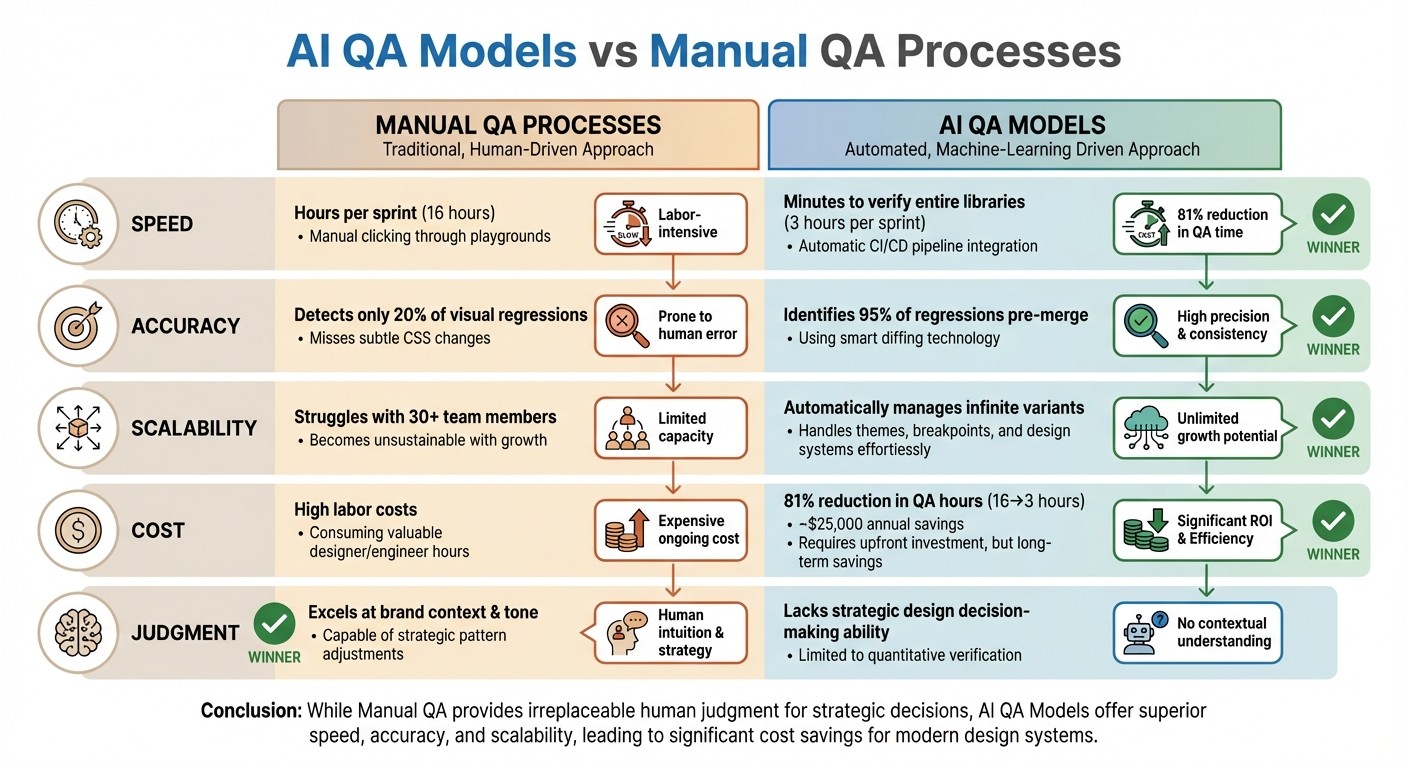
AI QA vs Manual QA for Design Systems: Performance Comparison
Building on the performance metrics mentioned earlier, here's a breakdown comparing AI QA models and manual QA processes across four key criteria:
Criterion | Manual QA Processes | AI QA Models | Advantage |
|---|---|---|---|
Speed | Requires hours per sprint, involving manual clicking through playgrounds and previews | Verifies entire libraries within minutes and runs automatically in CI/CD pipelines | AI QA |
Accuracy | Detects only about 20% of visual regressions and often misses subtle CSS changes | Identifies 95% of regressions pre-merge using smart diffing that filters out rendering noise | AI QA |
Scalability | Struggles as design systems expand; becomes unsustainable for teams of 30+ | Automatically manages infinite variants, themes, and breakpoints once tokens are set | AI QA |
Cost | High labor costs; consumes valuable designer and engineer hours on routine tasks | Reduces QA hours by ~81% (from 16 hours to 3 hours per sprint), though requires upfront investment | AI QA |
Judgment | Excels in understanding brand context, tone, and when to adjust patterns | Lacks the ability to make strategic design decisions | Manual QA |
The comparison highlights AI QA's strengths in speed, accuracy, scalability, and cost efficiency. AI thrives in repetitive, time-consuming tasks that often drain resources. As Vishwas Gopinath aptly puts it:
"AI is genuinely useful in the areas where your team is buried in repetitive, mechanical work. The patterns you already defined... that's the material AI can work with".
However, AI falls short when it comes to strategic judgment. Decisions about brand consistency, whitespace, and breaking design conventions for a better user experience still require human oversight. Manual QA plays a critical role in areas where design intent and nuanced judgment are key.
How Exalt Studio Uses AI QA in Design Systems
Exalt Studio has found a way to make design system workflows smarter by integrating AI-powered QA tools. These tools are particularly effective at catching visual drift - those subtle CSS changes, like tweaks to global spacing or box shadows, that manual reviews often overlook. Their workflow is broken into three distinct stages: Audit (checking WCAG compliance and analyzing components), Implementation (creating accessible libraries with a single source of truth), and Monitoring (using AI-driven regression testing). This approach helps streamline processes in high-pressure design environments.
For clients working on ongoing design retainers or MVP projects, this method consistently cuts down QA time while eliminating production issues.
The AI models at Exalt Studio rely on self-healing locators. Instead of using fragile selectors, these locators identify components based on visual features. This is a game-changer for dynamic platforms like Web3 and SaaS, where small rendering inconsistencies (like anti-aliasing) can lead to false positives. AI-powered diff engines filter out irrelevant noise and focus on meaningful changes, such as layout shifts, padding updates, or color contrast issues.
To ensure accuracy, Exalt Studio uses a component matrix that documents all components, theme variations (like light and dark modes), and responsive breakpoints (ranging from 320×568 to 1440×900 pixels). They also dynamically mask elements like timestamps to avoid unnecessary alerts. On top of that, the testing suite is fully integrated into CI/CD pipelines using tools like GitHub Actions or GitLab CI, running automatically with every pull request.
Conclusion
AI QA models offer clear benefits over manual processes, improving efficiency and accuracy across the board. Teams experience faster QA cycles and fewer errors, allowing them to shift their focus from repetitive checks to more strategic design work. Production errors become rare, and the savings go beyond just labor hours. By automating checks across countless component variations and responsive breakpoints, teams can spend their time on creative problem-solving instead of tedious grid inspections.
As these tools enhance performance, they also pave the way for scaling design systems. AI makes it possible to manage the complexity of growing themes, breakpoints, and token variations - challenges that manual teams simply can't handle. Vishwas Gopinath captures this perfectly:
"The mechanical work of keeping everything in sync scales faster than teams can keep up with manually".
This isn't about replacing designers. It's about removing barriers that slow down the growth and evolution of design systems.
The financial case for AI is just as strong. With poor software quality costing the U.S. market $2.41 trillion in 2022, the adoption of AI-powered QA isn't just a technical upgrade - it’s a business necessity. Organizations that embrace these tools see direct, measurable improvements in their bottom line.
For teams managing design systems in 2026, AI QA tools are no longer optional - they're essential. As shown, integrating AI QA not only simplifies workflows but also ensures the long-term health of your design system. At Exalt Studio, these models have become indispensable for maintaining high-quality systems. The technology has moved past the hype stage and is now a proven part of modern workflows, seamlessly integrating with CI/CD pipelines. Whether you're dealing with 50 components or 500, AI provides the consistent monitoring and intelligent validation that manual methods simply can't match.
Use AI to automate repetitive tasks like documentation updates, scaffolding variants, and baseline visual checks. Set semantic thresholds to focus only on meaningful changes. And most importantly, integrate these tools into your CI/CD pipeline to validate every pull request. The initial investment in AI QA pays off exponentially as your design system grows and your team’s productivity accelerates.
FAQs
How can AI QA models speed up maintaining design systems?
AI-powered QA models speed up the upkeep of design systems by automating tedious tasks like updating components, syncing design tokens across platforms, and producing real-time documentation. This automation helps spot and address inconsistencies early, cutting down on manual fixes and saving time.
With these tools in place, teams can reduce the time spent on error corrections by as much as 50%. This means designers and developers can dedicate more energy to crafting smooth, user-friendly experiences instead of getting bogged down by troubleshooting.
How do AI-powered QA models help reduce costs in design systems?
AI-powered QA models help cut costs by automating repetitive tasks and reducing reliance on manual testing. This approach not only speeds up the quality assurance process but also reduces the chance of human errors, allowing teams to identify and fix issues more quickly.
These models enhance detection accuracy and simplify workflows, which helps lower operational expenses while ensuring high-quality results. Plus, their ability to scale across projects ensures consistent performance, making them a practical choice for long-term efficiency.
Can AI-powered QA models replace manual quality assurance in design systems?
AI QA models offer several benefits to design systems. They can speed up testing, handle larger scales, and spot patterns or errors that manual testing might overlook. Despite these strengths, they aren't ready to completely replace manual QA. Human involvement remains crucial for interpreting complex situations, understanding user intent, and managing unique edge cases that demand creativity or contextual insight.
In reality, the most effective approach often blends AI-powered automation with manual QA. This combination takes advantage of the efficiency of AI while preserving the detailed, thoughtful quality that only human expertise can deliver.